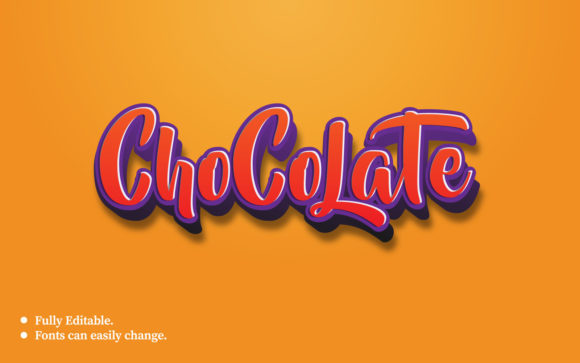
Chocolate 3D Text Effect Template
There is a specific kind of magic that happens when typography stops being flat and starts feeling tactile. We’ve all seen those glossy, rich, almost edible-looking headlines on social media ads or YouTube thumbnails that make you want to reach out and take a bite. That visceral reaction is exactly what the Chocolate 3D Text Effect Template is designed to trigger. It isn’t just about making letters look "cool"; it’s about leveraging texture and depth to create an immediate emotional connection with your audience.
This template, crafted in Adobe Illustrator, takes the concept of luxury and indulgence and translates it into a digital design tool. By simulating the rich, dark tones and smooth highlights of melted chocolate, it provides a sophisticated backdrop for text that needs to stand out without shouting. Whether you are a small business owner trying to boost engagement or a graphic designer looking for a quick win, understanding how to wield this tool effectively can transform mundane content into something memorable.
The Psychology of Texture in Digital Design
Before diving into the technical specs, it helps to understand why this aesthetic works so well. In a digital landscape saturated with clean, minimalist white spaces and stark black-and-white contrasts, warm, organic textures offer a sense of comfort and premium quality. Chocolate, specifically, carries subconscious associations with reward, celebration, and high value.
When you apply a 3D chocolate effect to your text, you aren't just changing the color; you are invoking a sensory experience. This is particularly powerful in industries where appetite appeal matters, but it extends far beyond food. A boutique hotel might use this style to promote a spa package, suggesting relaxation and richness. A jewelry brand could use it to highlight a limited-edition collection, implying exclusivity. The key here is versatility wrapped in a specific visual language.
Real-World Applications Across Industries
The beauty of this template lies in its adaptability. While the name suggests confectionery, the application is surprisingly broad. Let’s look at how different professionals might integrate this into their workflow.
Social Media Marketers and Influencers
If you manage Instagram stories or Pinterest boards, you know that static images often get lost in the scroll. A 3D text banner breaks the pattern. Imagine promoting a weekend sale with bold, chocolate-textured letters that pop against a neutral background. The contrast draws the eye immediately. Because the template includes easy photo-changing options, you can swap out the background image to match your brand colors while keeping the striking text effect consistent. This consistency builds brand recognition over time.
E-commerce and Retail Promotions
For online stores, click-through rates are everything. A product launch banner featuring the Chocolate 3D Text Effect Template can elevate the perceived value of an item. If you’re selling candles, bath bombs, or even coffee products, the chocolate theme creates a cohesive visual narrative. The 1920px x 1080px resolution ensures that these banners look crisp on desktop websites, while the RGB color mode keeps them vibrant on screens. It’s a simple way to add a layer of professionalism to promotional materials without hiring a custom illustrator for every single campaign.
Event Promotion and Invitations
Whether it’s a corporate gala, a wedding reception, or a local community fair, the right font treatment sets the tone. The 3D aspect adds weight and importance to the event details. When used for digital invitations shared via email or messaging apps, the rich texture makes the invitation feel like a physical card. This subtle touch can increase open rates and attendance, as recipients perceive the effort put into the design.
Technical Ease Meets Creative Freedom
One of the biggest barriers to using high-quality templates is the learning curve. Many designers shy away from complex PSD or AI files because they require advanced skills to navigate. This template addresses that pain point head-on. Being created in Adobe Illustrator CC, it leverages vector-based editing, which means you can scale your designs without losing quality—a crucial feature for anyone who needs to print large banners or resize graphics for different platforms.
The template is fully editable, which is a massive advantage. You aren’t stuck with pre-set fonts if they don’t align with your brand voice. The included free fonts ensure that you can start designing immediately without worrying about licensing fees, but you are free to replace them with your own typefaces. The text areas are clearly marked, allowing for quick customization. If you need to change "Summer Sale" to "Winter Clearance," it’s a matter of clicking and typing, not rebuilding the entire graphic from scratch.
Considerations for Best Results
While the template is robust, getting the most out of it requires a bit of strategic thinking. Here are a few practical tips to keep in mind.
- Background Contrast: The chocolate effect relies on light and shadow to create depth. Ensure your background images have enough contrast so the text remains legible. Dark backgrounds can sometimes swallow the text, so lighter or mid-tone backgrounds often work best to let the 3D effect shine.
- Image Quality: Since the template is set to 300 DPI, it is optimized for high-resolution output. Using low-quality placeholder images will detract from the professional finish. Always source high-res photos to match the template's capability.
- Color Harmony: The chocolate tones are deep and warm. Pair them with complementary colors like cream, gold, or soft pastels to maintain balance. Avoid clashing bright neons unless you are going for a very specific, avant-garde look.
Another important note is that the image is not included. This is standard for template purchases but worth remembering. You need to provide your own photography or illustrations. This actually gives you more control, allowing you to curate visuals that tell your unique story rather than being limited to stock photos provided by the creator.
Why Choose This Specific Template?
In a market flooded with generic text effects, the Chocolate 3D Text Effect Template stands out due to its attention to detail and user-centric design. The inclusion of a help file is a small but significant feature. It guides users through the customization process, reducing frustration and saving time. For busy entrepreneurs or part-time designers, time is money. A template that minimizes the guesswork allows you to focus on the message you want to convey rather than the mechanics of the software.
Furthermore, the fact that it is a banner template means it is ready-made for common marketing channels. You don’t have to agonize over dimensions; it’s already optimized for standard web and social media sizes. This readiness factor makes it an excellent resource for last-minute campaigns or rapid-fire content creation.
Final Thoughts on Implementation
Ultimately, the success of any design asset comes down to how well it serves your communication goals. The Chocolate 3D Text Effect Template is more than just a pretty face; it’s a functional tool that bridges the gap between artistic expression and practical marketing needs. By offering a blend of aesthetic appeal and technical ease, it empowers users to create content that feels both luxurious and accessible.
As you experiment with this template, remember that consistency is key. Use it across multiple touchpoints—your website headers, social media posts, and email newsletters—to create a unified brand experience. The rich, inviting nature of the chocolate 3D effect can become a signature element of your visual identity, helping you cut through the noise and connect with your audience on a deeper, more sensory level.